Starting operation
- Check whether there is visible damage to the collet (1) and clamping nut (2) before each use.
GGS 18V-10 SL/GGS 18V-20/GGS 18V-23 L
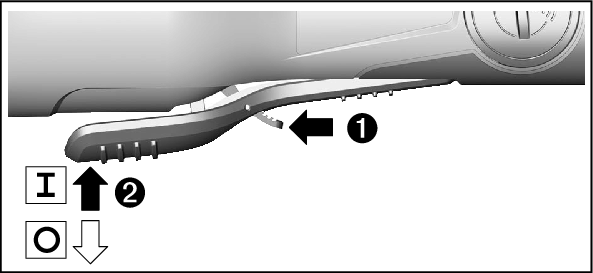
To start the power tool, slide the on/off switch (5) forwards.
To lock the on/off switch (5) in position, push the on/off switch (5) forwards and down until it clicks into place.
To switch off the power tool, release the on/off switch (5); or, if the switch is locked, briefly push the on/off switch (5) backwards and down and then release it.

The restart protection feature prevents the power tool from uncontrolled starting after the power supply to it has been interrupted.
To restart the tool, set the on/off switch (5) to the off position and then switch the power tool on again.
Note: Rapidly switching the power tool off and on again may trigger the restart protection, meaning the power tool may not start up even if the on/off switch (5) is pressed. Set the on/off switch (5) to the off position and then switch the power tool on again.
GGS 18V-10 SL
You can use the button for speed preselection (16) to preselect the required speed, even during operation. The information in the table below describes the recommended values.
Material | Application | Tools | Speed preselection level | [min–1] |
|---|---|---|---|---|
Metal | Milling | Router bit | 3 | 11500 |
Metal | Grinding | Grinding stones | 3 | 11500 |
Metal | Removing rust | Brush | 1 | 4500 |
Metal | Grinding | Abrasive sleeves | 3 | 11500 |
Metal | Grinding | Fan grinders, corundum A | 2 | 7500 |
Stainless steel | Grinding | Fan grinders, stainless steel | 2 | 7500 |
Metal | Grinding | Fleece tools | 1 | 4500 |
Metal | Grinding | Fleece tools, abrasive wheels | 1 | 4500 |
The values specified for speed levels are guide values.
- The rated speed of the accessory must be at least equal to the maximum speed marked on the power tool. Accessories running faster than their rated speed can break and fly apart.
GGS 18V-10 SL
Battery charge indicator (user interface) (14) | Meaning/cause | Solution |
|---|---|---|
Green | Battery charged | – |
Yellow | Battery almost empty | Replace or charge battery soon |
Red | Battery empty | Replace or charge battery |
Overload protection indicator (user interface) (18) | Meaning/cause | Solution |
|---|---|---|
Yellow | Critical temperature has been reached (motor, electronics, battery) | Run the power tool at no load and allow it to cool down |
Red | Power tool is overheated and will switch off | Leave the power tool to cool down |
Power tool status indicator (user interface) (17) | Meaning/cause | Solution |
|---|---|---|
Green | Status OK | – |
Yellow | Critical temperature has been reached or rechargeable battery is almost empty | Run the power tool at no load and allow it to cool down, or replace or charge the battery soon |
Illuminated red | Power tool has overheated or rechargeable battery is empty | Allow the power tool to cool down, or replace or charge the battery |
Flashing red | KickBack Control, restart protection or Drop Control has been triggered | Switch the power tool off and on again |